Computer Virus infection is only removed through antivirus programs as you know, but this time we are talking about Shortcut Virus which
is a new modern virus automatically comes in your computer/USB/SD card
and convert your content into a shortcut. Some time this virus also
invisible your all contents. The first thing I really got mad for the
Shortcut virus problem is not removable by anti-virus programs. When you
Scan your Shortcut virus infected storage with anti-virus program they
give “No threat detected” which was really confusing and who didn’t
know how to remove this virus, they just format the infected storage, So
if you’re helplessness to format your storage then please don’t do this
gain, because it is not a solution but if your storage not contain
anything important then you should format your secondary storage device
not computer storage because formatting also a another method to flush
out shortcut virus.
The cause of this virus is internet, third party software’s, USB storage devices and more sources also. Sometime you connect your pen drive to your friend’s computer for exchanging data and you didn’t know is your friend’s computer is already infected by shortcut virus, So when you connect those pendrive to your computer it automatically infect your computer also.

Connect Your USB storage (Pendrive/SD card) to your Computer.
Scan your storage with your antivirus program (Not compulsory but its effective) > If your antivirus found virus then delete it.
Type in Command prompt : attrib -h -r -s /s /d <Your USB drive letter>:\*.* (See <Your USB drive letter> from My computer and then type it For ex, if your drive letter is “D” then the command is like: ” attrib -h -r -s /s /d D:\*.* “)
To know about this command Type ” attrib /? ” In CMD.

Now your Shortcut files again convert to normal files. Delete unknown files from your storage after command process completes. I highly recommend you to after removing shortcut virus copy your USB data to your computer > Format the USB storage > Then again re-copy USB data back.
Download USB fix and install (If your antivirus showing virus in this software then please disable it for a few minutes)
Close all the programs from taskbar, you are running, because when it start it auto close your all programs and you may lose your data.
Connect all of your external storages to computer > Choose clean
It automatically cleans your shortcut virus problems from all USB storages and don’t forget to restart your computer after using this tool because it make changes in windows directory and until you restart your computer, your computer will not work properly.
> Type: attrib -h -r -s /s /d <Your drive letter>: \*.* (For ex. if your drive is C: then the command is “attrib -h -r -s /s /d C:\*.* “)
OR
Use this software: Shortcut Virus Remover
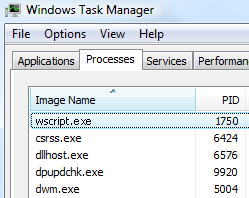
Actually the shortcut virus is running in the task manager process > You may kill that process and your computer doesn’t create again shortcut in real time.
Open task manager > Select process (More detail) > Scroll down below and search “wscript.vbs” process > Select them and end task
Use one of these software’s to remove Wscript from your computer:
The cause of this virus is internet, third party software’s, USB storage devices and more sources also. Sometime you connect your pen drive to your friend’s computer for exchanging data and you didn’t know is your friend’s computer is already infected by shortcut virus, So when you connect those pendrive to your computer it automatically infect your computer also.
Remove Shortcut Virus From Pen Drive & SD Card
There are 2 methods you can use to remove this virus: using CMD or Software Tool. Before beginning I highly recommend you to First Scan storage with your antivirus and then go for below method. If your pen drive is bootable then it may change to normal.Method 1 > Using command prompt
Open Command prompt as Administrator (Windows 7 or earlier: Windows key + R > Type CMD & ENTER, Windows 8: Search for “CMD” > Right click to CMD and Select “Run as Administrator” or right click over Start button and select “command prompt (Admin) “)Connect Your USB storage (Pendrive/SD card) to your Computer.
Scan your storage with your antivirus program (Not compulsory but its effective) > If your antivirus found virus then delete it.
Type in Command prompt : attrib -h -r -s /s /d <Your USB drive letter>:\*.* (See <Your USB drive letter> from My computer and then type it For ex, if your drive letter is “D” then the command is like: ” attrib -h -r -s /s /d D:\*.* “)
To know about this command Type ” attrib /? ” In CMD.
Now your Shortcut files again convert to normal files. Delete unknown files from your storage after command process completes. I highly recommend you to after removing shortcut virus copy your USB data to your computer > Format the USB storage > Then again re-copy USB data back.
Method 2 > Using Software
There are multiple software found in web for fixing this problem so i use USB Fix for this tutorial because it works great and freeware.Download USB fix and install (If your antivirus showing virus in this software then please disable it for a few minutes)
Close all the programs from taskbar, you are running, because when it start it auto close your all programs and you may lose your data.
Connect all of your external storages to computer > Choose clean
It automatically cleans your shortcut virus problems from all USB storages and don’t forget to restart your computer after using this tool because it make changes in windows directory and until you restart your computer, your computer will not work properly.
Flush out from your Computer Hard disk
Removing this virus from your computer feels a little harder than USB, because USB is a small storage, but your computer hard disk is a large storage that you cannot revert changes like a CTRL+Z. The first time when I found this virus in my laptop, I re-install my windows, but after when I found tools for this problem I start using only tools, because re-installing windows waste your lots of time and shortcut virus is not a very big deal as you think.Fix shortcuts already created on your drive
If your computer files have already converted into shortcut then you should try command prompt same as above method> Type: attrib -h -r -s /s /d <Your drive letter>: \*.* (For ex. if your drive is C: then the command is “attrib -h -r -s /s /d C:\*.* “)
OR
Use this software: Shortcut Virus Remover
Actually the shortcut virus is running in the task manager process > You may kill that process and your computer doesn’t create again shortcut in real time.
Open task manager > Select process (More detail) > Scroll down below and search “wscript.vbs” process > Select them and end task
Use one of these software’s to remove Wscript from your computer: